Features · Databases
MySQL and MariaDB side by side on Mac.
Bothy is a native Mac app for local PHP development. Its database side runs as many MySQL and MariaDB servers as you need, each on its own port with its own data directory, and gives every site its own databases, snapshots and one-line imports.
Why run more than one database server
Most local setups give you one MySQL. That's fine until production runs MariaDB 10.x for one client and MySQL 8.4 for another, and the differences start to matter: collation defaults, JSON handling, reserved words, the odd query that works on one and not the other. Testing against the engine and version you'll deploy to catches those before your client does.
Homebrew can install several mysql@X.Y formulas and mariadb, but by default they all want port 3306, the same socket and the same data directory. Bothy handles that part: every server gets its own port, socket and data directory under ~/Library/Application Support/Bothy/mysql, and runs as its own launchd user agent.
Every server, every database, one screen
The Databases screen lists each server with its port and socket, the databases on it, and which sites use them. Create and assign databases, import a dump, take or restore a snapshot, or open phpMyAdmin from the same place.
- Multiple servers on different ports
- Snapshots, restore and .sql/.sql.gz/.zip import
- phpMyAdmin at phpmyadmin.test
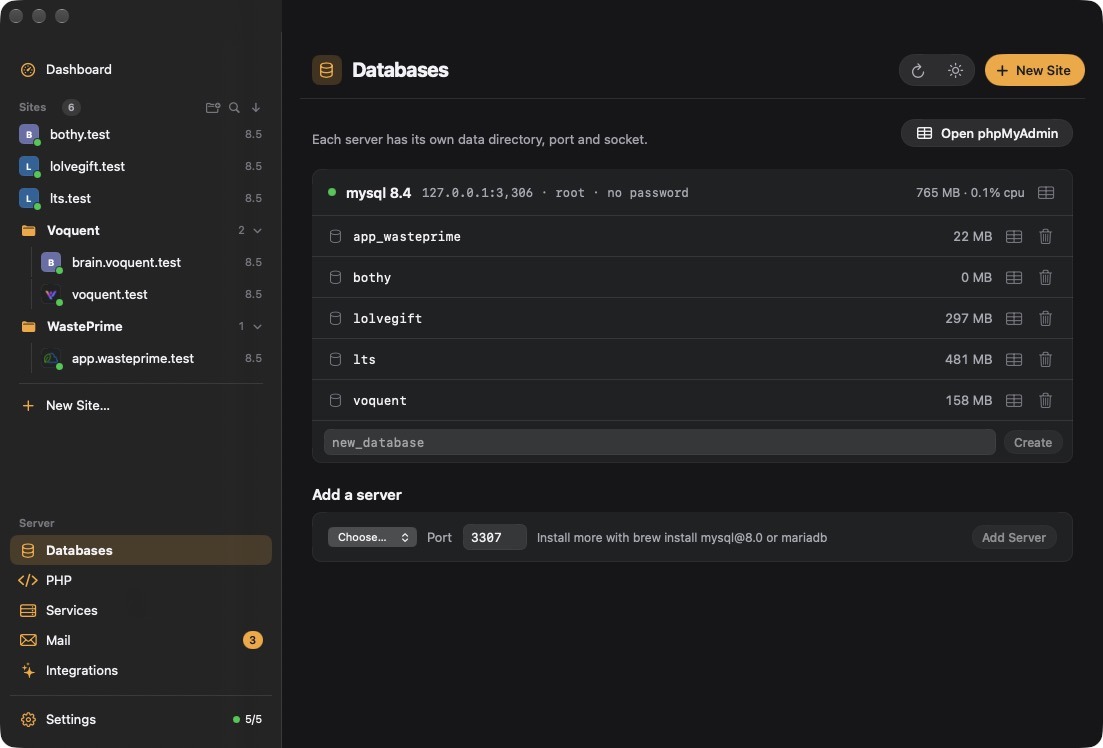
Adding a second server
Install the formula with Homebrew, then tell Bothy about it and which port to use.
- 1Install the formula
Any
mysql@X.Yformula, ormariadb.brew install mysql@8.0
- 2Register it with Bothy
Bothy creates the data directory and socket, and starts the server as a launchd agent on the port you give it.
bothy db add-server mysql@8.0 --port 3307
- 3Connect
User
root, no password, host127.0.0.1on that server's port (3306 for the first), or the socket shown in the Databases screen.
Databases belong to sites
A database can be assigned to a site. That link is what lets Bothy include the right dumps when you export a site, and lets the site's stats show database size alongside requests and PHP. It's also how the starters write wp-config.php or .env pointing at the right database from the first request.
bothy db create shop_db
bothy site db shop assign shop_db     # or --create to make it in one go
bothy site db shop                    # list what's assigned
New sites can get a database straight away with bothy site add shop --php 8.3 --db.
Snapshots before you do something risky
A snapshot is a gzipped dump of one database. Take one before running a migration, a plugin update or a search-and-replace across a WordPress database, and if it goes wrong, restore it. Restore drops and recreates the database, so you get exactly the state you snapshotted rather than a merge.
bothy db snapshot shop_db
bothy db snapshot --list
bothy db restore shop_db shop_db-2026-09-27.sql.gz
Because it's one command, it's easy to script (a snapshot before every deploy test) or to ask an AI assistant to do before it touches data; the MCP tools bothy_db_snapshot and bothy_db_restore do the same thing.
Importing production dumps, DEFINER and all
Pulling a copy of production down is where local imports usually fail. Dumps taken on a managed host often contain DEFINER=`someuser`@`%` clauses on views, triggers and routines. Locally that user doesn't exist, so the import stops with a privileges error halfway through.
Bothy's import strips DEFINER clauses as it loads, accepts .sql, .sql.gz and .zip as they come from your host's backup tool, and creates the database if it doesn't exist yet:
bothy db import shop_db ~/Downloads/prod.sql.zipphpMyAdmin and raw SQL
phpMyAdmin runs at https://phpmyadmin.test. bothy pma opens it, and bothy pma shop_db goes straight to one database. Any other client (TablePlus, Sequel Ace, DBeaver) connects with the details above.
For quick checks there's no need to open anything:
bothy db query shop_db "SELECT COUNT(*) FROM users"Add --json and the result comes back machine-readable, which is how scripts and shell agents use it. Through MCP the same thing is bothy_query, so an assistant like Claude can look at the data it's debugging rather than guessing at it.
Questions
Yes. Each server Bothy manages has its own port, socket and data directory, so MySQL 8.4 on 3306 and MariaDB on 3307 run side by side without interfering.
User root with no password, host 127.0.0.1 on the server's port. The first server uses 3306.
The dump references a database user that doesn't exist locally. bothy db import strips DEFINER clauses so views, triggers and routines load cleanly.
It drops the database and recreates it from the gzipped dump, so you get exactly the snapshotted state.
Under ~/Library/Application Support/Bothy/mysql, one directory per server. Uninstalling Bothy can remove it, so take snapshots first if you need them.
Bothy manages MySQL and MariaDB servers. PostgreSQL isn't one of its managed services.