Features · PHP
Multiple PHP versions on Mac, per site.
Bothy is a native Mac app for local PHP development. It installs PHP versions side by side from Homebrew and lets every site choose its own, so a legacy client project on 7.4 and a new build on 8.3 run at the same time, each at its own https://name.test.
Why one PHP version per Mac stops working
If you only ever work on one project, the PHP that Homebrew links into your PATH is fine. The moment you look after more than a couple of sites it isn't. An older WordPress plugin that falls over on 8.2, a Laravel app that needs 8.3, a client whose production box is still on 8.1 and who wants you to test against exactly that: you end up relinking PHP, restarting a web server and hoping you remember to switch it back.
The usual workaround is Docker, which solves it by giving every project its own container and costs you disk, memory and file-sync speed on macOS. Bothy takes the other route: native Homebrew binaries, with the version decided per site rather than per machine. If you want the do-it-yourself background first, the guide to multiple PHP versions on a Mac covers the Homebrew approach by hand, and PHP development without Docker explains the trade-off.
How it works under the hood
PHP versions come from the shivammathur/php Homebrew tap, which packages every supported release (and several older ones) as php@X.Y formulas that can be installed alongside each other.
One php-fpm master per version
For each installed version Bothy runs a single php-fpm master process as a launchd user agent. It keeps running when you quit the app and is restarted by launchd if it crashes, so sites don't disappear because you closed a window.
One pool per site
Inside that master, every site gets its own FPM pool. Caddy, which serves all your .test sites, hands each site's PHP requests to that site's pool. Switching a site to another version moves its pool to the other version's master and nothing else on the machine changes.
The pool-per-site design is what makes the rest of this page possible. Because each site has its own pool, it can carry its own php.ini overrides, and Bothy can read each pool's FPM status separately to show per-site PHP stats on the site monitoring screens.
PHP versions and php.ini, in a form rather than a text file
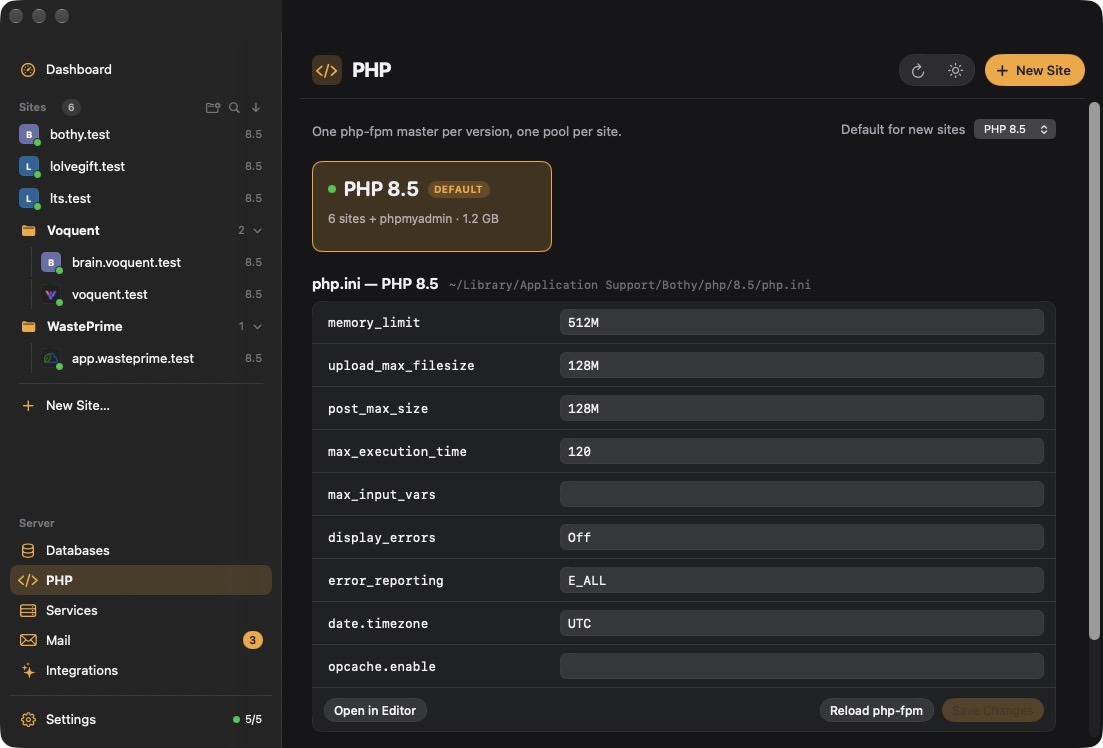
The PHP section of the app lists installed versions, which sites use each one, and the common php.ini directives for every version. A site's own page has the same form for its overrides, so raising memory_limit for one heavy import doesn't mean raising it for everything.
- One php-fpm master per version, one pool per site
- Per-version php.ini and per-site overrides
- Xdebug toggle per site
Installing, switching and removing PHP versions
Everything below can be done from the app; these are the equivalent bothy commands.
- 1Install another version
Pulls the formula from the shivammathur tap and starts a php-fpm master for it.
bothy php install 8.2
- 2Create a site on a specific version
New sites take a
--phpflag;--dbcreates a database for it too.bothy site add shop --php 8.3 --db
- 3Switch an existing site
Moves the site's pool to the 8.2 master. Reload the page and you're on the new version.
bothy site php shop 8.2
- 4Remove a version you no longer need
Bothy refuses to uninstall the default version or any version a site still uses, so you can't strand a site by accident.
bothy php uninstall 7.4
Per-site and per-version php.ini
There are two layers of configuration, and it's worth knowing which to reach for.
- Per-version php.ini applies to every site on that version. Each version's file lives at
~/Library/Application Support/Bothy/php/X.Y/php.ini. Use it for things you want everywhere, like a largerupload_max_filesize. - Per-site overrides sit on top, for one site only. Use them for the odd project that needs more memory, a longer
max_execution_timefor a migration, or different error display settings.
Setting and checking ini values from the terminal:
bothy php ini 8.3 upload_max_filesize 256M   # every site on 8.3
bothy site ini shop memory_limit 1G          # just this site
bothy site ini shop                          # show shop's overrides
Full syntax is in the PHP docs.
Extensions, Composer and the command line
The Redis and Memcached extensions are installed per PHP version from the add-ons screen or with bothy addon php-ext redis 8.3, alongside the Redis and Memcached services themselves. Xdebug is installed for a version the first time you switch it on for a site on that version (see per-site Xdebug).
The command line is where multiple PHP versions usually bite: your terminal's php isn't necessarily the one the site runs on. bothy site exec runs a command in the site's folder with that site's PHP first on the PATH, so Composer, artisan, WP-CLI and PHPUnit all use the right version:
bothy site exec shop -- composer install
bothy site exec blog -- wp plugin list
When this matters most
- Agencies and freelancers with a long tail of client sites on whatever PHP their host runs.
- Upgrades: switch a site to the next version, watch its PHP log for deprecations, and switch back in one command if it isn't ready.
- Package authors checking a library against more than one release.
- AI-assisted work: the MCP server exposes the same operations (
bothy_install_php,bothy_set_site_php,bothy_set_site_ini), so an assistant can switch a site's version and read the resulting PHP log itself. See Bothy's MCP server.
Questions
Whatever the shivammathur/php Homebrew tap provides for your Mac, installed as php@X.Y. Bothy doesn't ship its own PHP builds.
Yes. Each version has its own php-fpm master and each site its own pool, so a 7.4 site and an 8.3 site are both served simultaneously with no switching.
No. bothy site php shop 8.2 only moves that site's pool. Other sites and the versions they use are untouched.
Each version's file is at ~/Library/Application Support/Bothy/php/X.Y/php.ini. Per-site overrides are managed with bothy site ini or on the site's page in the app.
A version can't be removed while it's the default or while any site uses it. Move those sites to another version first with bothy site php.
Use bothy site exec <site> -- <command> to run tools with a site's PHP first on the PATH, which is the reliable way to get the right version per project.